
How to Get Maximum Speed on Rapidgator: The Ultimate Premium Guide (2026)
If you have ever tried downloading a large file on a free account, you know the frustration: 50KB/s speeds, 60-second wait timers, and endless captchas. In 2026, time is money. This guide explains how a Rapidgator Premium account transforms your downloading experience and why using an official reseller is the safest way to upgrade
1. Why Your Downloads are Slow (and how to fix it)
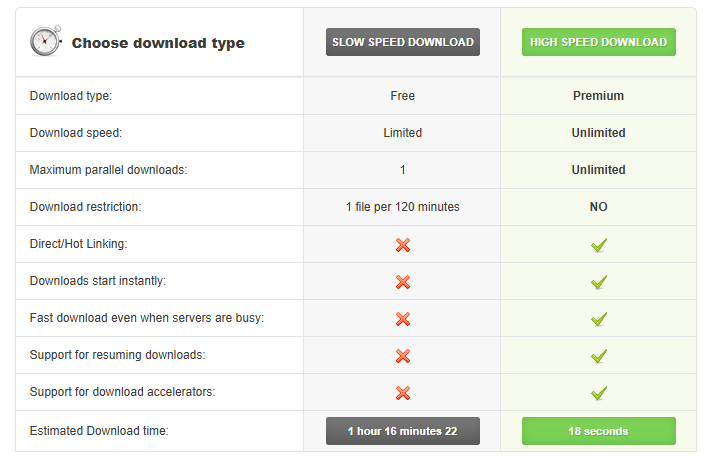
The “Free” version of Rapidgator is designed for occasional small files. To unlock the full power of your fiber-optic or 5G connection, you need a Rapidgator premium key.
- Uncapped Speed: Premium users move from the “Slow Lane” to “Priority Servers.”
- No Wait Times: Start your downloads instantly—no more 60-second countdowns.
- Resume Support: If your internet drops, you can resume a 50GB file right where you left off instead of starting over.
2. Integrating with JDownloader 2 and IDM
One of the biggest secrets to high-speed downloading is using a manager. When you buy a Rapidgator premium voucher from PopularPremiums, your key works perfectly with:
- JDownloader 2: Automate your link grabbing.
- Internet Download Manager (IDM): Use “Dynamic Segmentation” to download 5x faster than a standard browser.
3. Is it Safe to Buy Rapidgator Keys?
Many users worry about putting their credit card details into unknown sites. This is where using a Rapidgator PayPal reseller becomes essential. At PopularPremiums, we provide:
- Instant Email Delivery: No waiting for a manual admin to approve your order.
- PayPal Protection: Use the world’s most secure payment gateway.
- 24/7 Support: Our team helps you activate your key if you run into any issues.
4. How to Activate Your Rapidgator Premium Code
Activating your account is simple and takes less than 60 seconds:
- Copy the 12-digit code received in your email.
- Log in to your rapidgator.net account profile.
- Navigate to the “Premium” or “Profile” section.
- Paste your key into the “Voucher Code” box and click “Apply.”
Conclusion Don’t let slow speeds hold you back. Whether you are downloading large archives, high-definition media, or backup files, a premium account is a game-changer.
👉 Get your Rapidgator Premium Account via PayPal here!
Buy Popular Premium Accounts from Official PayPal Reseller
Nowadays, almost all file hosts do not provide PayPal direct payment gateway. It is very difficult for customers to buy Popular File Host Premiums with PayPal.
So, customers must find a reseller who accepts payment via PayPal. But before doing any online transactions, provide honest personal detail is important for a valid PayPal account.
Everyone are advised to make their account to be verified. Verified and no anonymous buying is a need in today’s e-currency system to prevent any fraud transactions.
Yes, PopularPremiums can use VISA or Master to pay, but everyone worry about their privacy and credit card security!
Good PopularPremiums Reseller must accept PayPal, so we accept PayPal , and we have more than 99k customers happy and satisfied using our services.
We are google verified and recommended Premium PayPal Reseller and you can buy Popular File Host Premium Account via PayPal Reseller
PopularPremiums.com – has price same as official website!
PopularPremiums credit card gateway charge so much while other file host normally won’t. So people love to buy from Premium reseller.
It is very easy ? Many customers are purchasing PopularPremiums voucher, PopularPremiums account from us and we are best authorized Premium PayPal Reseller.
We also provide quick support via email , and prompt response time. We also provide live chat support so that customer can buy Popular premium from PopularPremiums.com who are the best official Popular Premiums reseller in world
Instructions For Buying PopularPremiums Account using PayPal
Steps to buy Popular Premium Accounts
1. Open the website: https://popularpremiums.com
2. Select the validity days.
3. Click the BUY NOW / PayPal button against the Validity days.
4. You will be redirected to PayPal payment gateway with appropriate amount.
5. Enter the Email Address associated with PayPal and the password for making the payment successful.
6. You can also pay with any credit/ debit cards like Visa, MasterCard, AMEX, JCB, PaySafeCard through PayPal.
- Once Payment is successful, you will receive the Email (inbox, spam / junk) with login details.
NOTE: The error when you did your payment! Please reload the PayPal page if you see it.
As you can understand, file hosting services, particularly Popular Premiums Accounts Reseller is what you require for your job. You can have lots of wonderful experiences while working.
You can buy Premium account by using an Popular Premiums Accounts Reseller which is very convenient named
https://popularpremiums.com